Print Conductor9.0.2401
Publisher Description
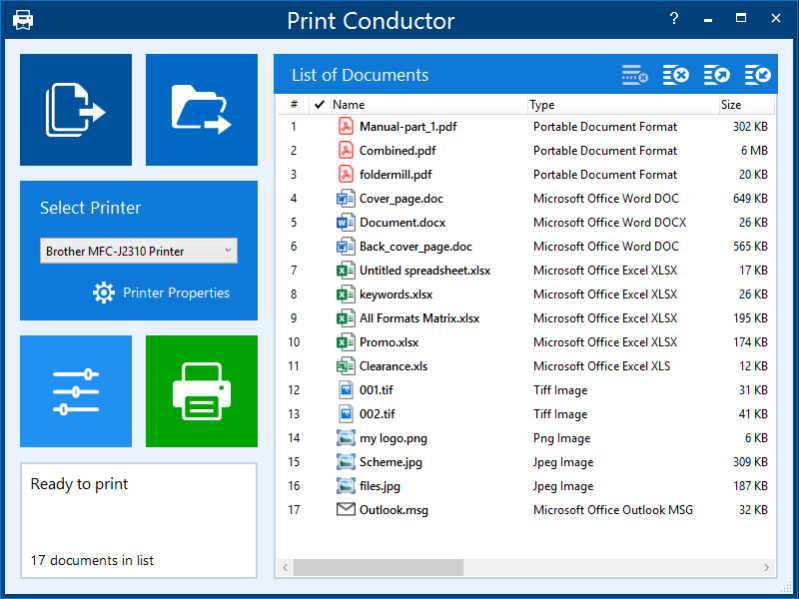
Print Conductor is a batch printing software. If you regularly have to open and print multiple files, this smart tool can be a real time-saver.
Manually printing several files is tedious work - it generally requires opening and printing each file separately in the applications used to create them. Once you add files to print, Print Conductor automates the rest of the process.
Print Conductor is easy to use. Just add files to be printed to the list and click the 'Start Printing' button.
All popular file formats are supported: PDF files, plain texts, Microsoft Office and OpenOffice documents and presentations, RTF, HTML, MHT, XML files, AutoCAD, Solidworks and Inventor drawings, Visio charts, Photoshop PSD, JPG, TIFF, PNG, PCX, DCX, BMP and JBIG images, WMF and EMF metafiles.
Print Conductor can batch print large quantities of documents on any type of printer: desktop printers, network printers or virtual printers. If you select Universal Document Converter as a virtual printer to use with Print Conductor, you can batch convert a list of documents, presentations, worksheets or drawings to a variety of other formats: PDF, TIFF, JPEG, PNG, GIF, PCX, DCX, or BMP.
What's new in version 8.1:
- New supported file formats: VCF, EMLX, STP (STEP), EPUB, PRN;
- Printing XLS, XLSX and CSV file without MS Excel;
- Barcodes and QR-codes as a watermark, adding multiple watermarks simultaneously;
- Changing opacity for Image watermark;
- New Preview pane in the List of Documents;
- Selecting color mode for different pages or page ranges;
- Skipping blank pages of documents;
- Setting Scale mode for any file in the List of Documents;
- Running Print Conductor with pre-defined Settings and pre-saved List of Documents;
- Adding a multi-line text watermark;
- New Text watermark macros;
- Adjustable time delay before each document is printed;
- Setting initial folder for Add Documents and Add Folder buttons;
- New Cover page Designer;
- Other improvements
About Print Conductor
This Printer program is available in English, Arabic, Chinese, Czech, Dutch, French, German, Italian, Japanese, Polish, Portuguese, Russian, Spanish, Swedish, Turkish. It was last updated on 29 September, 2026. Print Conductor is compatible with the following operating systems: Windows.
The company that develops Print Conductor is fCoder SIA. The latest version released by its developer is 9.0.2401. This version was rated by 1 users of our site and has an average rating of 5.0.
The download we have available for Print Conductor has a file size of 169.9 MB. Just click the green Download button above to start the downloading process. The program is listed on our website since 2024-01-19 and was downloaded 888 times. We have already checked if the download link is safe, however for your own protection we recommend that you scan the downloaded software with your antivirus. Your antivirus may detect the Print Conductor as malware if the download link is broken.
How to install Print Conductor on your Windows device:
- Click on the Download button on our website. This will start the download from the website of the developer.
- Once the Print Conductor is downloaded click on it to start the setup process (assuming you are on a desktop computer).
- When the installation is finished you should be able to see and run the program.
Program Details
General
System requirements
Download information
Pricing
Version History
version 9.0.2401
posted on 2024-01-19
Quick preview of recently saved Print Conductor Settings file (.INI) when using the Import button
Exporting recent log files as a ZIP file, including current Print Conductor Settings
Saving a Detailed report on each print session as PDF to a user-defined folder automatically
Bug fixes and more
version 9.0
posted on 2023-08-28
New and improved component for printing HTML files
New and improved CADLib component for printing DWG and DXF files
New and improved Microsoft Outlook PST files' processing component
Printing a cover page between the email and its attachments
Other improvements and bug fixes
version 9.0.2308
posted on 2023-08-28
New actions for "unknown" attachments: Ignore, Replace with placeholder, and Try to process
Defining the number of pages to print for each new print job
Setting print job names using any text or a template
Saving a file list (FLIST) containing relative file paths
Other improvements and bug fixes
version 8.1.2304
posted on 2023-04-27
New supported file formats: VCF, EMLX, STP (STEP), EPUB, PRN;
Printing XLS, XLSX and CSV file without MS Excel;
Barcodes and QR-codes printing, adding multiple watermarks simultaneously;
Changing opacity for Image watermark;
New Preview pane in the List of Documents;
Other improvements.
version 8.0.2207
posted on 2022-07-05
New supported file types: iCalendar (ICS), Adobe InDesign INDD, KOMPAS-3D, obsolete DOC and XLS.
Print TXT files in "direct" mode.
Set color background for text watermark.
New text watermark macro that adds item number in the List of Documents.
Improved sorting of attachments.
Bug fixes.
version 8.0
posted on 2021-11-10
Printing DOC, DOCX, and RTF files without Microsoft Word;
Printing EML, MSG message files without Microsoft Outlook;
Redesigned Advanced Settings panel;
Options to export/import settings profiles;
Ability to skip repeated pages;
Localization to Swedish and Arabic;
Other improvements.
version 7.1.2104.5100
posted on 2021-04-05
Ability to change print job name when printing in Single print job mode
Using different input printer trays in Single print job mode
Change the TEMP folder for temporary files
Keep source files available for editing when printing
Validation of printer status for each newly printed file
And more
version 7.1
posted on 2020-10-19
New post processing actions: move, copy or delete files after printing; New custom page zoom feature; Printing headings of Excel spreadsheets; Loading files from selected folders at start-up; New supported file types: iCalendar (ICS), Adobe InDesign INDD, KOMPAS-3D, obsolete DOC and XLS; And more
version 7.0.2005
posted on 2020-05-27
New graphical interface; New smart file processing core; New Advanced Settings tab; New supported formats: Outlook PST, OST, DICOM; Ability to print files in single print job mode; Printing several pages on a single paper sheet; Adding page numbers and file names via text watermark and more
version 6.3
posted on 2019-05-13
Printing multiple DWG and DXF drawings without CAD software; Printing multipage ZPL labels; New supported formats: Microsoft Visio VSDM and PowerPoint PPTM; New cover page template; Compatibility with eDrawings Viewer 2019; Ability to recover page range value after restarting and more
